Showing posts with label Octave. Show all posts

23 February 2021

a STANAG-5066 (off-line) dissector


S5066 dissector (free software licensed under the GNU General Public License - GPL) is a GNU Octave coded tool that accepts as input a filename.txt file containing a stream of ASCII 0's and 1's (no space between) and, accordingly the input arguments, prints out:
a. filename_out file containing the decoded headers of the STANAG-5066 stack (DTS, CAS, SIS)
b. filename_addr file containing the changes of the traffic flow direction  (change of the source and destination node address)
c. filename_<n> files containing the user-data in ASCII-bits or ASCII-chars format
The output of the decoded headers is also shown on the Octave Command Window (the Command Window anyway does not allow you to browse the whole output).
The STANAG-5066 stack is scanned bottom up (starting from DTS layer)  as if the bistream were being parsed by a receiving node; since the dissector goes back up to the user data, it also shows some informations about the User-to-User Protocol as well as the Client Application type (BFTP, TTHMS, FRAP,...) and the basic transport protocol (RCOP/UDOP).
The input ASCII file being analyzed may be produced by a modem or a decoder (such as sorcerer, k500,...) which have the task of removing the HF waveform overhead (110A, S-4285, S_4539, ...), therefore this dissector is an "off-line" tool: a real-time version needs much more work (and code) other than a pc with the synchronous interface (users' standard pc are equipped with async interfaces).
The dissector is primarily thinked to work on (decoded) on-air symbols, hence its goodness will depend either on the quality of the signal and the precision of the modem/decoder. This is a beta and anyway STANAG-5066 Edition 3 compliant version: bug-fix (and maybe Edition 4 compliant) releases will follow.

Requirements:
1) GNU Octave >= 6.1 (see this post for Octave installation)
2) the input file should contain only '0's and '1's, ie no spaces or some other separator char between the values; preferably without LF/CR: in that case the software will reshape the contents and warn the user with the message "reshaping file, wait..."

Usage:
S5066(fn,i,f,cout,t)
  fn = filename containing a stream of ASCII 0's and 1's
 i,f = range of frames to be processed (i=0 first, f=0 last)
       0,n [1 - n]
       n,0 [n - last]
       n,m [n - m]
       n,n [only n-th frame]
cout = 0 do not extract user data (do not reassembly C_PDUs)
     = 1 extracts the user data in ASCII-bits format (0's and 1's)
     = 2 extracts the user data in ASCII-char format
   t = 1 tracks the changes of the flow direction (0 = no action)

Usage examples (notice that at each run the previous output files are overwritten):
S5066 ("test.txt",0,0,0,0)
process all the frames of the file and prints out the file:
- test_out.txt

S5066 ("test.txt",0,0,2,1)
process all the frames of the file and prints out the files
-  test_out.txt
-  test_addr.txt
- test_<n>.txt files containing the user data (as many files as the reassembled C_PDUs); since the parameter cout has the value 2, the user data files are in ASCII-char format (Extended ASCII code is used, a proper editor is recommended) 

A short report is printed at the end of the headers file along with the "elapsed time"; by the way, the time taken depends on several elements:
- the need to reshape the input file
- if user data extraction is required and its format (bit/char)
- the number of frames to be processed (length of the input file)
- type of data transfer
and - obviously - on the performances of your pc. Below an example of two reports the same input file (s23.txt, 1Mb length) with and w/out reshaping:


Installation
Download S-5066.ZIP and expand it in your Octave directory, usually c/users/<your_name>/octave. Will be created the S-5066 directory containing the files "README.txt" and "test.txt" along with the subdirectory /m which contains the Octave scripts.


Change the working directory to .../octave/S-5066 and run the command addpath ("./m") so that Octave will know where to look for .m files: as usual, the /m subdirectory 

then you can run and try S5066 using the input arguments that you prefer. The test.txt file contains a STANAG-5066 bitstream relating to a real on-air transmission: ie it does not have  a "perfect" protocol layout as if it were captured at the output of a STANAG-5066 server. I also want to remember that S5066 is a passive dissector only and does not simulate a receive node (it does not implement timings, receive windows, and other stuff).
Below some commented examples of output files (headers files): their study may offer some useful insigths to understand how STANAG-5066 works. 

Figure 1 is related to the simple ARQ service (type 0 D_PDU), the frames from 141 to 152 allow to follow the transfer of a segmented C_PDU.

 
Figure 1

A) The C_PDU START flag of the frame #142 is set to indicate the start of a newly segmented C_PDU; the C_PDU segment contained within this D_PDU is the first segment of the C_PDU; the C_PDU END flag is clear. In frame #152 the C_PDU START is clear and the C_PDU END flag is set to indicate the end of a segmented C_PDU.
 

B) The first segment is conveyed by the D_PDU with sequence number #22, the last segment by the D_PDU with sequence number #32, ie eleven D_PDUs. As expected from the encapsulation (each sublayer adds its header), only the D_PDU with the initial C_PDU segment (sequence number #22) is followed by the other sublayer headers (CAS, SIS, and user protocol) while the following D_PDUs contain only a C_PDU segment.

C) The EOT (End Of Transmission) field provides an approximation of the time remaining in the current transmission interval from the beginning of the current D_PDU. More precisely, the number in this field is a binary number expressing the number of half (1/2) second intervals, thus the flow controll allows a maximum transmission interval of about 2 minutes.
 

D) As you can see in the size of segmented C_PDU field, each segment has a size of 200 bytes, except the last segment which is 26 bytes length. The whole C_PDU is then composed of (200x10)+46 = 2046 bytes; adding the headers of the (11) D_PDUS needed to convey the segments we get a total of 2246 Bytes. Since that the needed transmission time is about 15 seconds (difference of the EOT fields), the transfer speed is 1200 bps.

If all D_PDUs between and including the C_PDU START and C_PDU END (frames from 142 to 152) are received completely error free the link layer will assemble the C_PDU segments and deliver the result to the higher sublayers.
 
C_PDU Re-assembly for ARQ Delivery Services
 
Figure 2 is related to the NON-ARQ service (type 7 D_PDU), the frames 1-6 allow to follow the transfer of a segmented C_PDU.
 
Figure 2
 
A) Instead of the start/end flags mechanism seen in ARQ service, the NON-ARQ service signals the start and the end of a segmented C_PDU by means of the C_PDU segment offset field and the (unsegmented) C_PDU size field; the D_PDU with the C_PDU segment offset = 0 indicates the first segment (ie the the start of a newly segmented C_PDU). The end of a segmented C_PDU is reached when the sum of the received segments sizes is equal to the C_PDU size field (ie 1078 in this example). Notice also that all D_PDUs containing segments from the same C_PDU have the same C_PDU ID number (in this case 2570).

B) The EOT field has obviously the same meaning seen in the ARQ service example (time remaining in the current transmission interval).

Each segment has a length of 200 bytes, except the last which is 78 bytes length. The whole C_PDU consists of 1078 bytes; adding the headers of the (6) D_PDUS needed to convey the segments we get a total of 1222 Bytes. Since that the needed transmission time is about 6 seconds (difference of the EOT fields), the transfer speed is 1600 bps.
The re-assembly process for Non-ARQ C_PDUs uses the C_PDU ID Number, Segment-Offset field, C_PDU-Segment-Size field, and C_PDU-Size field to determine when all segments of a C_PDU have been received.The segments that are reassembled are expected to have passed the CRC error-check and have no detectable errors.
 
C_PDU Re-assembly for NON-ARQ Delivery Services

Figure 3 is related to the tracking of the traffic flow direction, still in experimental version. That feature coud be useful in case of a recording of a ARQ-type session which comprises both data and ACKs sendings. At present, it simply records the changes of the SENDER/DESTINATION address along with the D_PDU type and frame number. 
 
Figure 3

Although the dissector does not care the user data, it also provides a raw(!) extraction and reassembly of the C_PDU segments.
 
 
Some features as the tracking of the traffic flow direction, controls/checks of inconsistencies and some other ones as the CRC check and C_PDUS segments reassembly, will be implemented in next releases.
Comments, suggestions and bugs reports are welcome!

13 February 2021

install, run and test GNU Octave against T207 and CIS-11 streams

updated

This is just a quick how-to for Octave since some friends asked me for some tips about the installation and use of Octave with some analysis tools such as the ones for T207 and CIS-11 streams (...and hopely soon for the STANAG-5066 dissector).
GNU Octave is a high-level interpreted language, primarily intended for numerical computations. It provides capabilities for the numerical solution of linear and nonlinear problems, and for performing other numerical experiments. It also provides extensive graphics capabilities for data visualization and manipulation.
The GNU Octave language is largely compatible to Matlab so that most programs are easily portable. In addition, functions known from the C standard library and from UNIX system calls and functions are supported. C/C++ and Fortran code can be called from Octave.

The easiest way to install GNU Octave on Microsoft Windows is by using MXE builds. For the current release, both 32-bit and 64-bit installers and zip archived packages (.zip and .7z formats) can be found here under the Windows tab:
https://www.gnu.org/software/octave/download.html 
For executable (.exe) installers (the better way) the user can simply run the downloaded file and follow the on-screen installation prompts. It is recommended that the installation path does not include spaces or non-ASCII characters. Shortcuts to the program will be created automatically on the desktop: CLI for the command line and GUI for the graphic user interface, the latter (GUI) is the one that is normally used:

 The installation steps are shown below:


After the installation is finished you will have to create the main working directory, usually c/users/<your_name>/octave; this will be the the right place where to create the sub-directories to store the Octave .m scripts. For example, create the sub-directory /signal_analysis and download the file t207-test.txt to it, then create the sub-directory /m (within /octave/signal_analysis) and download the script T207_detect.m into the /m sub-directory (T207_detect.m is a tool to verify the presence of the so-called T207 "format"). Now double click on the GNU Octave GUI icon and Octave will start in its Command Window


Change the Current Directory from  /octave to /octave/signal_analysis by using the arrows of the file browser, and then run the two commands:

addpath ("./m")
T207_detect ("t207-test.txt",32,14)

The first command (addpath) tells Octave where to look for the invoked .m scripts, i.e. the su-b-directory /m where you previously downloaded the script T207_detect. The second command launches the T207_detect.m script which will process the file t207-test.txt: an ASCII-bit file containing a demodulated FSK bitstream, i.e. the file to analyze that you previously downloaded to the /signal_analysis sub-directory (the other parameter is the desired frame size, 14).


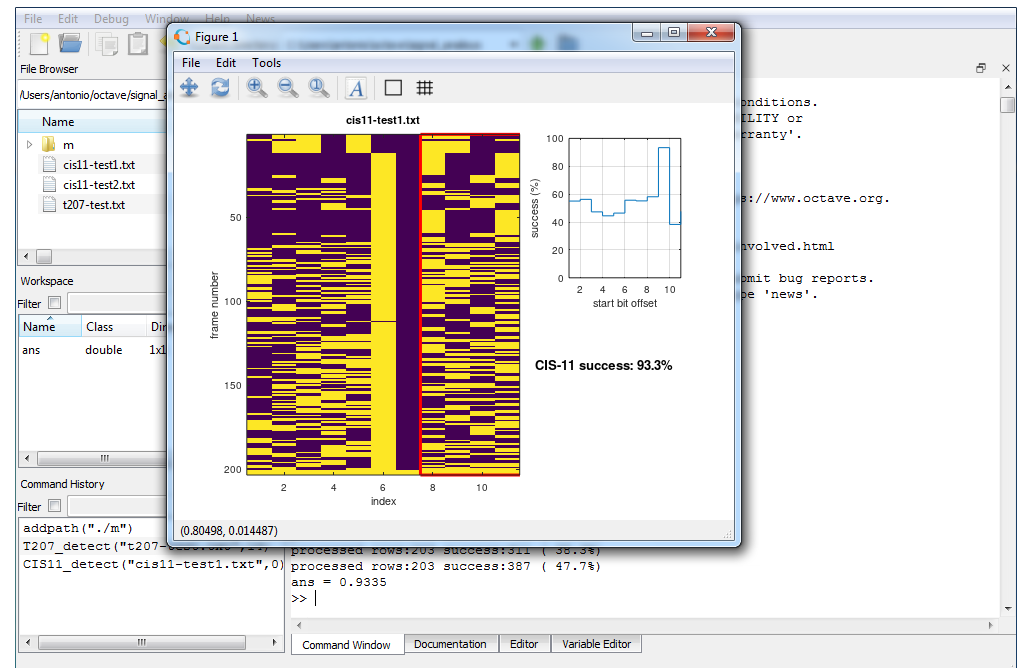
after few seconds (depending on the speed of your pc) you will see the result of the T207 detection:


After close the Figure 1 window, you may also see the results shown in the textual form. Now Octave is ready to accept a new command:

You can switch to the Editor Window in order to open and edit the scripts in the /m sub-directory


Well, in the same way as above, now you can analyse - for example - a bitstream to check the presence of the CIS-11 format:

1) download the .m script CIS11_detect.m to the sub-directory /octave/signal_analysis/m
2) downolad the files cis11-test1.txt  and  cis11-test2.txt to the sub-directory /octave/signal_analysis
3) switch to the Command Window and run the command  CIS11_detect against the two files:


In a few words:
/octave/signals_analysis     > will contain the files to be analyzed
/octave/signals_analysis/m > will contain the various Octave scripts

Well, now you are probably wondering what you have done.

1) An interpreted language (as for example BASIC or Java) is a kind of programming language whose implementations execute instructions directly and freely, without previously compiling a program into machine-language instructions: the "interpreter" will convert the the high-level language code into the code understand by the operating system (say assembly language or machine-language). 

2) Well, as said at the beginning of the post, Octave is something like a "software environment" which consists of a high-level interpreted language, the interpreter, several software "libraries" that you may link to your Octave code, editor and various utilities all grouped inside the graphic user inteface. Thus when you click the GUI interface you do nothing but load and run the Octave environment.

3) When you wrote the "T207_detect" command in the Command Window, you simply told the interpreter to read and execute the Octave code language instructions saved in the "T207_detect.m" file, passing it some parameters such as the name of the data file to be examined (t207-test.txt).

4) Strictly, T207_detect.m is not indicated as a "program file" but rather as a "script file", ie a file containing any sequence of Octave commands (say instructions). It is read and evaluated just as if you had typed each command at the Octave Command Window prompt, and provides a convenient way to perform a sequence of instructions (you can't do that with a compiled language such as C). 

5) At the end of the day, T207_detect.m is nothing else that a sequence of Octave instructions that implement the algorithm described here in order to check if all the 14-bit sequences of a file verify the T207 checksum: even on large files the computer will take a few seconds, it would take hours, beer and coffee (lots of coffee ) if you do it by hand. 

Yes I know, that's a very basic approach to Octave but I hope it will allow you to start to work with some useful scripts, understand how it works... and maybe start to learn Octave. By the way, two important resources:
https://wiki.octave.org/Octave_for_Microsoft_Windows
https://it.wikipedia.org/wiki/GNU_Octave

27 July 2020

CIS-11 (TORG 10/11)

CIS-11 (also designated as TORG 10/11) is a synchronous, duplex ARQ system requiring separate forward and return links. It's used mainly for aeronautical weather reports in CIS, thus transmissions normally take place in M2 alphabet (Cyrillic third-shift ITA-2). Modulation used is FSK2, usually 100Bd and 500Hz shift with 11-bit period (figure 1).

Fig. 11
Its characteristic 11-bit format consists of the 5 bits of the ITA-2 alphabet d4-d0 (but in reversed bit order: d0-d4), 2 system state bits s0 and s1 and 4 parity bits p0-p4: the checksum is calculated by modulo-2 addition from all 7 other bits (d4-d0 + s0-s1) as: 

p0 = d1 + d3 + d4 + s0
p1 = d0 + d2 + d4
p2 = d0 + d1 + d3 + s1
p3 = d0 + d2 + d3 + s0 + s1

Fig. 2
I wrote a simple Octave script (CIS11_detect.m) just to check CIS-11 streams and extract the 5-bit data in case of  successful result:

## usage: CIS11_detect(fn,e)
## input:  fn ... filename containing a string of 0's and 1's (no space between)
##         e  ... 0 doesn't exctract data
##            ... 1 extracts M2 data
## output: m  ... CIS-11 parity bits success [0..1]
##         a  ... aligned bit frames: parity bits in a(8:14), in case m > 0.9
##         fn_M2-data.txt
##                ASCII file with the exctracted data, in case m > 0.9 and e = 1

CIS11_detect is downloadable from:
(you will need the GNU Octave package [1] to run the script).

I checked two transmissions and results are shown in Figs. 3,4; note the values of the system state bits (the two solid columns) in the two streams.
Fig. 3
Fig. 4
The system state bits signal the link state and traffic information, below a possible relationship just based on the (few) analyzed recordings:
00   - idle or Request
01   - ?
10   - Cyrillic
11   - Latin
transition to Cyrillic traffic is signaled by 00000 10
transition to Latin traffic is signalled by 11111 11

CIS-11 uses also two "idle signals", according to ITU-R F.342-2 [2]): idle signal α "01101 00 1100" is used when no data to transmit is available and mantains sync between transmitting and receive modems; idle signal β "10101 00 0001" is the ARQ request character. It's to note that:
- both the idle signals have the system state bits set to 00
- if shifted(!) the idle signal β is CIS-11 compliant (look at start bit offset in Fig.5)
- idle signal α is a LFSR x^3+x^2+1 sequence, the 7-bit sequence is used in d0-d4,s0-s1 bits
- idle signal β can be scrambled using the LFSR x^5+x^4+1

Fig. 5

22 June 2018

redefining T-207 (CIS-14) checksums

T-207 (T-207, T-207 2M "VIKTORIA" - Soviet teletype encryption device) is a multiplexed two channels "system" that is used in several CIS waveforms. Since the lack of official documentation it's difficult to say much more about the T207: guys from radioscanner talk about "equipment" as a in-line ciphering device while ex DDR STASI archives refer to T207 as an "encryption algorithm".
CIS-14 (also known as as TORG 14) is a designation of a transmission mode: a full duplex system using FSK at several speeds (42.1Bd, 47.5Bd, 48Bd, 50Bd, 70.5Bd, 72Bd, 83.3Bd, 84.21Bd, 94.11Bd, 96Bd, 100Bd, 144Bd, 192Bd, 200Bd, 288Bd, ...) and shifts. Data of two independent data channels can be processed; they are in MTK-2 alphabet (Russian [Cyrillic] Third-shift ITA-2, sometimes also called "ITA-2 Cyrillic M2") thus have 5 bits per character, but are transmitted in 14-bit frames, each containing two characters.
As shown in figure 1, the data code words (A in the figure) of the two channels are amended with two leading "channel state" bits and then either word-interleaved (case B) or bit-interleaved (case C). Two parity bits are calculated over the complete 12-bit frame generated and expand it to the final 14-bit frame. The two bits indicating the channel state signify whether the channel contains traffic(bit = 0) or idle (bit = 1) sequences at the moment.
Fig. 1 - 14 bit frame (from R&S Manual of transmitting methods)
Additionally, a variant of CIS-14 has been observed using frames of 28 bits. As can be seen in figure 2, after having established the 14-bit frame(s) (B) form the datawords (A) as explained above, two of these frames are bit-interleaved (C) to the new28-bit frame.

Fig. 2 - 28 bit frame (from R&S Manual of transmitting methods)
Note that although T207 is "hardware" while CIS-14 is a transmission mode, I use T207 in this blog as an implicit reference to CIS-14.

software tools (download)
- The Octave script T207_detect.m  has been used for the check of T207/CIS-14 mode:
T207_detect.m
- The Octave script T207_detect_e.m also extracts the two world and bit interleaved channels:
https://yadi.sk/d/zsCD73C9DZpHPQ
(the two Octave scripts are coded by me and Christoph, you will need GNU Octave package [1] to run them)
- The software CIS14-C.exe (coded by cryptomaster) can be used to etract the two 5-bit channels from a 10-bit stream C-interleaved:
https://yadi.sk/d/IfdhHvf3mMcZXQ

As said in a previous posts, T207 detection had to be manually spotted by processing the demodulated bitstream and checking if it matches the criteria described in this post in radioscanner forum: the Octave scripts are now improved and detects the presence of T207 checksums in a given bit stream and for each permutation of the checksum bits.  T207_detect scripts are very useful since encrypted CIS-14 messages have ACF=0 and anonymous demodulated streams, clear-text messages instead may be recognized as CIS-14 by the "solid" columns of the channel state bits.

I run the script against several waveforms and the results are very interesting.So far, I found two checksum modes termed "3" or [3120] and "20" or [0312]:
  

T207/CIS-14 verified waveforms (so far)
(note that some waveforms  can be coded with both the two checksums)

checksum mode 3 [3120]:
VFT 3x100Bd/1440, VFT 6x100Bd/120
FSK 50Bd/1000, FSK 100Bd/500 
F7B 100Bd/1000 (on one channel)

checksum mode 20 [0312]:
VFT 3x100Bd/1440, VFT 6x100Bd/120
FSK 50Bd/1000, FSK 96Bd/500, FSK 96Bd/1000
FSK 100Bd/500, FSK 100Bd/1000, FSK 100Bd/2000
F7B 96Bd/500 (on one channel), F7B 100Bd/1000 (on one channel) 


T-207 2M "VIKTORIA"

25 May 2018

NATO naval broadcast and KW-46 encryption

This post follows up and completes the one of Christoph where he noticed the presence of LFSR delimited 7-bit frames in STANAG-4285 payloads using GNU Octave scripts.
Given that: 

1) the HF waveform STANAG-4285 is largely used for NATO naval broadcasts;

2) the markers consist of the bits of pseudo-random sequence generated by the polynomial x^31+x^3+1, as specified by STANAG-5630 and already seen in FSK 50Bd/850;

3) those bits (termed "Fibonacci bits") are used by KW-46 cryptographic equipment to provide  synchronization; 

we can assume that NATO naval broadcasts are secured with KW-46 encryption (code name Vallor). 

We analyzed several STANAG-4285 transmissions in both 600L and 1200L sub-modes picked up in well-known frequencies belonging to British, Danish, Dutch, French, German, Norwegian and Spanish Navy as (frequency USB/S4285 sub-mode):
 
05361.8/600L
07554.6/1200L
08170.2/600L
08408.2/600L
08612.2/600L
09095.0/1200L
10186.2/1200L
10264.1/1200L
10733.3/600L
11538.3/600L
12958.3/600L
13057.7/600L
13410.1/1200L  
 
and in all we verified the presence of the Fibonacci bits.

STANAG-4285 bitstreams after deinterleaving and convolutional decoding
Fibonacci bits (before descrambling) 


By the way, NATO naval broadcast consists of a continuous coded stream of data which is typically be transmitted over multiple HF frequencies at the same time, providing an uninterrupted data flow from shore to ships. In the absence of messages to be transmitted, "jam" messages (pseduo-random chars) is injected into the data stream.

28 May update
NATO RATT (4481-F) 75Bd/850, same story as above, ie:
"taps" 1000000000000000000000000000100 = polynomial x^31+x^3+1 = KW-46 encryption. 
This stream has been processed using Octave scripts and Christoph's C++ code.